Knowledge Base
Tracking Variance
Four columns, three time-states
The Variance view sets the frozen Budget beside the live Estimate and the Actual recorded so far, adds the share of the estimate spent, and ends on the variance itself.
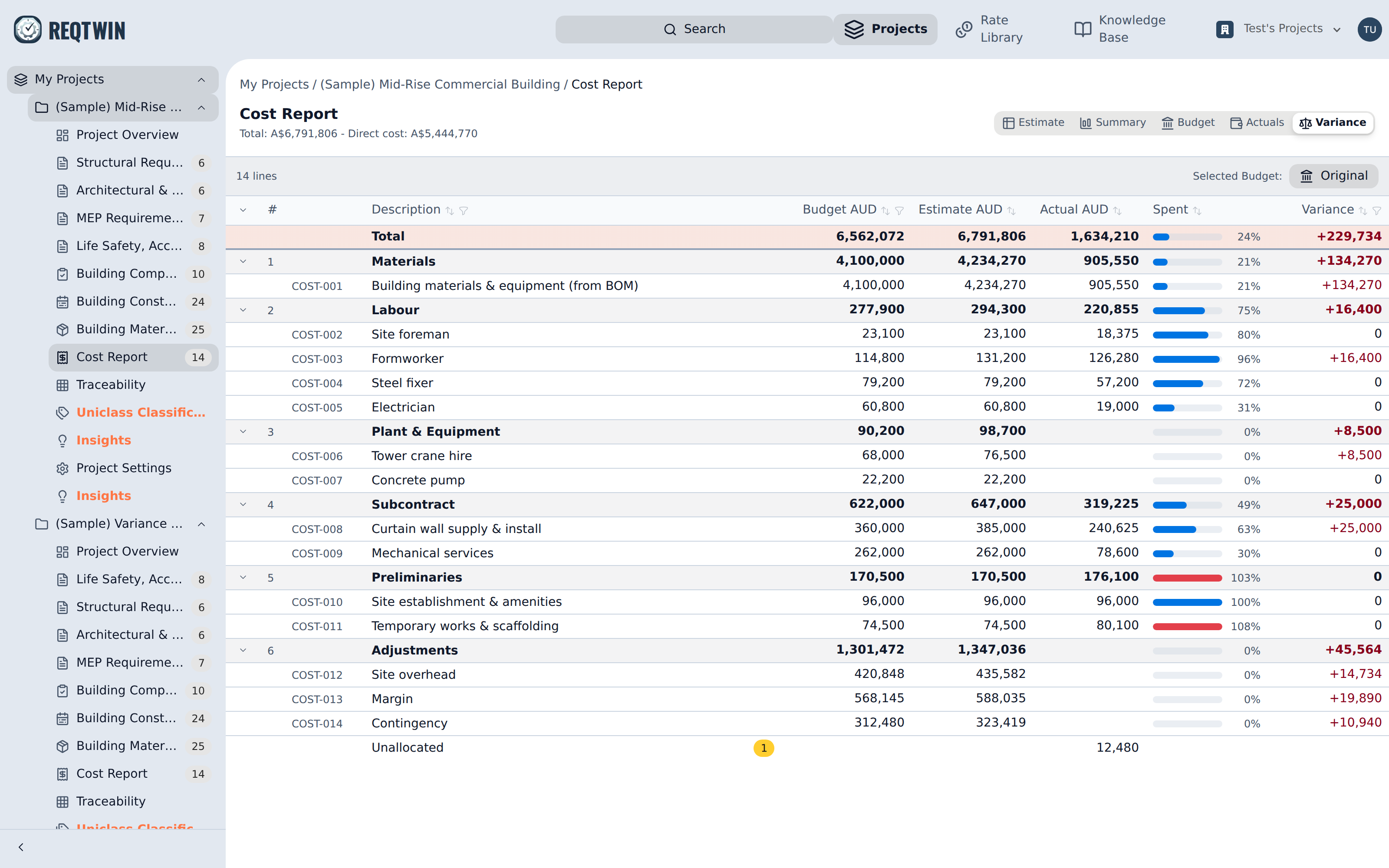
The Variance view: budget, estimate, actual, spent and variance, per line and per section.
Variance is estimate minus budget, not actual minus budget. On a half-built project the second figure reads as a large saving and only means the invoices have not arrived yet. Actual to date is still shown, as its own column and as a percentage of the estimate, but the variance arithmetic does not run on it.
Because the report keeps being edited after the freeze, the estimate is also the forecast: re-estimating a line is the act of re-forecasting it. There is no separate forecast field to maintain.
Scope that appeared or disappeared
Rows are the union of both sides. A line added after the freeze has no budget to compare against and is badged New; a budgeted line since deleted from the report is badged Descoped and keeps its budget figure, because the budget total was fixed at the freeze. Hiding either would defeat the point of the view.
A budget line of zero is not the same thing as an unbudgeted line: the first is a deliberate decision to spend nothing.
Percentage lines
A percentage line typically shows a budget, an estimate, no actual at all, and a large negative variance until somebody re-estimates it. That is correct rather than missing data. It is also how contingency drawdown works here without any drawdown machinery: when a real line overruns, its variance goes positive, and reducing the contingency line to absorb it produces an equal and opposite negative variance. The offset is visible per line and the bottom line does not move.
Reading the totals
The frozen row at the top totals the same four figures for the whole document, and the Unallocated row at the bottom carries any spend not yet posted to a line, which clicking opens for allocation.
The toolbar names the revision every figure here is measured against, and clicking it goes to the Budget view. Before anything is approved it reads Set a budget instead. Changing which revision is in use re-bases the whole view.